
Follow the instructions below to connect your Porkbun domain with Storable Easy.
Note: You must contact our support team by sending an email to easysupport@storable.com once you finish these steps. We need to enter your domain URL into our system for your website to go live.
If you want to connect your Porkbun domain to Storable Easy and they don't provide an IP address, but they do provide a hostname, you can do so via URL forwarding by following the instructions below.
URL Forwarding
If your web hosting company specifically requests you forward your root domain to "www" here's how to do it.
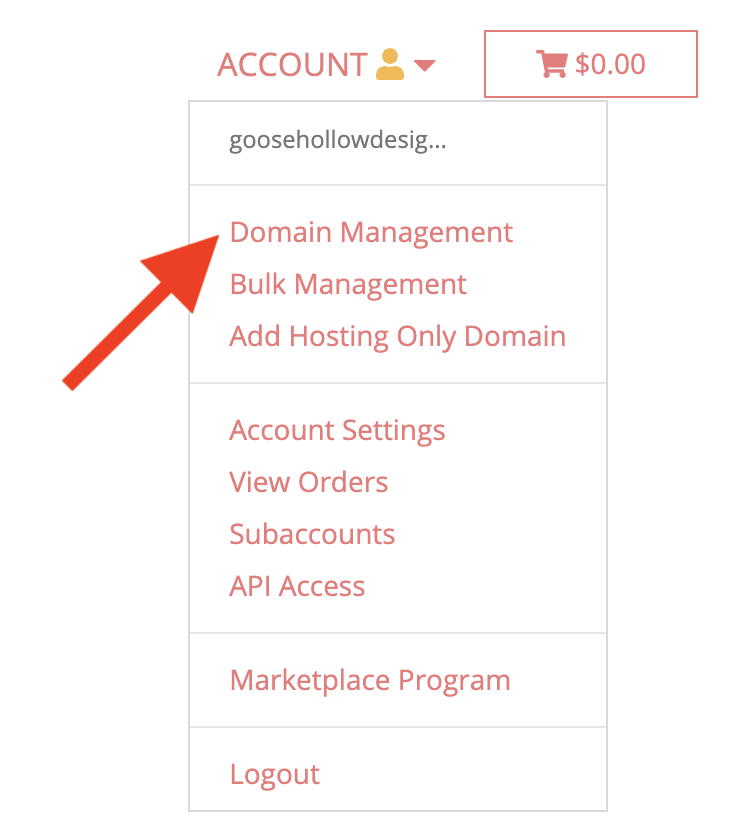
Log in to your Porkbun account. You should arrive at the Domain Management screen. If you're already logged in, click your username in the top-right corner and select Domain Management:
2. Click the drop-down list to the far right of your domain. Then click Edit next to URL Forwarding.

Enter http:// or https:// followed by your domain (ex: www.yourdomain.com).

Delete the "wildcard" record that was created. This is a CNAME record that has an asterisk (*) in the Host field. To do this, return to the Details menu and select Edit next to DNS Records.

Locate the CNAME record and delete it by clicking the garbage icon to the far right. Don't delete the one without the asterisk.

Once deleted, replace that record with a new CNAME record. This record will have "www" in the Host field. The answer will be “aws.storageunitsoftware.com”.

7. Email easysupport@storable.com and send us the domain name so we can update our servers with your domain information.